프롬프트에 보이지 않게 코파일럿이 남겨놓은 로그에 대하여,
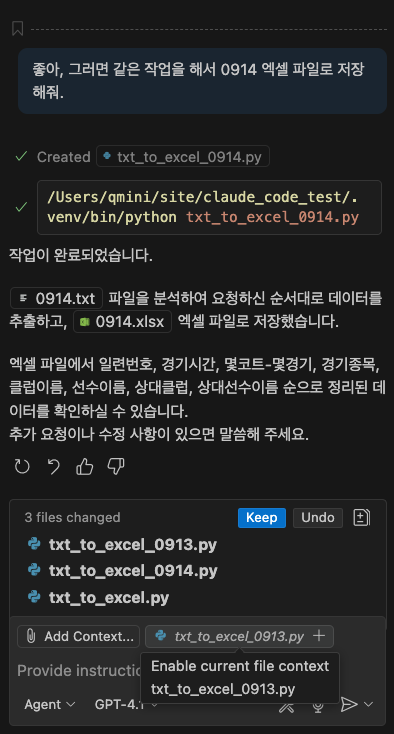
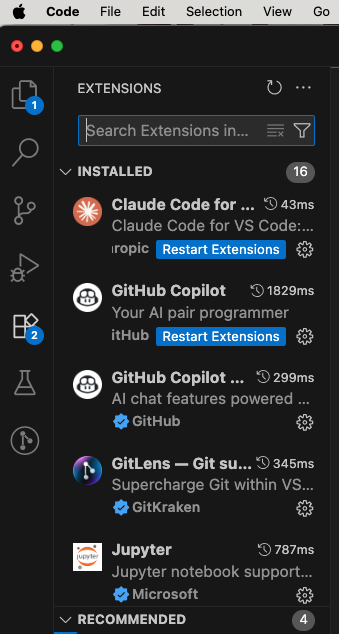
VS Code에서 GPT-4.1 또는 Copilot을 통해 텍스트 파일을 읽어 엑셀로 작성하는 자동화 작업을 실행할 때 “GitHub Copilot: Made changes.”와 같은 메시지가 파일에 복사되는 이유는, Copilot의 액션 로그 또는 자동 편집 히스토리 요약이 코드 작업의 결과로 파일 최상단 혹은 작업 영역에 삽입되기 때문입니다[1][2][3].
현상 설명
- GitHub Copilot이나 GPT-4.1 Agent Mode에서 자동 편집, 파일 생성, 변환 작업을 하면 Copilot이 실행 결과 또는 변환 내용을 안내, 요약하거나 ‘코파일럿이 이 파일에 변경을 적용했다’는 로그성 메시지를 파일에 남깁니다[1][2].
- 이 메시지는 실제 코드와 무관하게, 사용자가 수정내역을 명확히 알 수 있도록 기록되는 일종의 모니터링 기능입니다[3].
발생 원인
- VS Code와 Copilot, GPT 확장(특히 Agent 모드)은 작업 기록을 남기는 기능을 자동 활성화하며, 종종 파일 혹은 셀에 “Made changes.” 등의 텍스트를 추가합니다[1][2].
- 외부 자동화(예: 코드로 엑셀파일 생성)시, Copilot의 로그가 같이 포함되는 경우가 있는데 이는 GPT-4.1을 통한 명령 실행시 ‘변경 내역을 기록’하려는 기본 옵션 때문입니다[3].
해결 방법
- 자동 로그 남김을 원치 않을 경우, Copilot/GPT 관련 확장의 환경설정 메뉴에서 ‘변경 메시지 기록’ 옵션을 비활성화하거나, 결과 파일 생성 시 불필요한 로그 텍스트를 필터링 또는 삭제하는 후처리(예: 문서 첫 줄 삭제 등) 스크립트를 추가하면 됩니다[2][3].
- 최신 Copilot 및 GPT-4.1/4o 플러그인은 버전에 따라 로그 메시지 출력 방식이 다를 수 있어, 확장 설정 업데이트와 VS Code 자체 업데이트, 플러그인 환경 재설정도 필요할 수 있습니다[4][5].
참고 및 추가 정보
- Copilot Agent Mode에서는 더 적극적으로 변경내역 요약 메시지를 자동 삽입하는 경향이 있습니다[3].
- 개발자 커뮤니티에서도 GPT-4.1이 본문에 예기치 않게 로그 텍스트를 삽입하는 현상에 대해 동일한 문제를 보고하고 있습니다[2].
요약하면, “GitHub Copilot: Made changes.” 메시지는 자동화 명령의 실행 및 기록을 위해 Copilot/GPT 확장이 의도적으로 파일에 삽입하는 로그 메시지이며, 확장 설정을 바꾸거나 후처리 코드를 추가하여 제거할 수 있습니다[2][3][1].
출처
[1] Why does Copilot (GPT-4o / 4.1) Agent Mode feel more like Edit/Ask … https://www.reddit.com/r/GithubCopilot/comments/1lf2gvf/why_does_copilot_gpt4o_41_agent_mode_feel_more/
[2] GPT-4.1 is rolling out as new base model for Copilot Chat, Edits, and … https://www.reddit.com/r/GithubCopilot/comments/1ki5b6f/gpt41_is_rolling_out_as_new_base_model_for/
[3] Introducing GitHub Copilot agent mode (preview) https://code.visualstudio.com/blogs/2025/02/24/introducing-copilot-agent-mode
[4] copilot in visual studio code wont let me use GPT 4o says “included … https://github.com/orgs/community/discussions/166227
[5] April 2025 (version 1.100) – Visual Studio Code https://code.visualstudio.com/updates/v1_100
[6] Automatically adjust pasted code with GitHub Copilot – YouTube https://www.youtube.com/watch?v=zklV3In9KU8
[7] GitHub Copilot file editing tools not working properly with … https://github.com/orgs/community/discussions/165295
[8] ChatGPT for Microsoft Excel – How-to Guide https://gptforwork.com/blog/chatgpt-for-microsoft-excel-how-to-guide
[9] GitHub Copilot 코드 검토의 책임 있는 사용 https://docs.github.com/ko/copilot/responsible-use/code-review
[10] Edit your Excel VBA with VS Code (with auto-sync) https://www.youtube.com/watch?v=xoO-Fx0fTpM
[11] 끌어오기 요청에서 제안된 변경 내용 검토 https://docs.github.com/ko/enterprise-cloud@latest/pull-requests/collaborating-with-pull-requests/reviewing-changes-in-pull-requests/reviewing-proposed-changes-in-a-pull-request
[12] Visual Studio Code: Auto-refresh file changes https://stackoverflow.com/questions/30078077/visual-studio-code-auto-refresh-file-changes
[13] GPT-4.1 in Copilot is Driving Me Mad – Where Did the … – GitHub https://github.com/orgs/community/discussions/163630
[14] GitHub Copilot를 사용하여 코드 리팩터링 https://docs.github.com/ko/copilot/tutorials/refactor-code
[15] VS Code + Excel VBA: Write Better Macros Faster https://www.youtube.com/watch?v=QCgM2KswL8s
[16] GitHub Copilot 텍스트 완성의 책임 있는 사용 https://docs.github.com/ko/copilot/responsible-use/copilot-text-completion
[17] GitHub Copilot Chat 응답 사용자 지정 정보 https://docs.github.com/ko/copilot/concepts/response-customization?tool=vscode
[18] Chat GPT for Macros : r/excel https://www.reddit.com/r/excel/comments/106cw1q/chat_gpt_for_macros/
[19] Visual Studio With GitHub Copilot – AI Pair Programming – Microsoft https://visualstudio.microsoft.com/github-copilot/
[20] Copilot을 사용하여 작업을 수행하는 방법에 대한 모범 사례 https://docs.github.com/ko/enterprise-cloud@latest/copilot/tutorials/coding-agent/get-the-best-results
답글 남기기